How I Develop Pure Commons Apps
| 4 min read
A couple1 of people have asked what my process is for developing the various Pure Commons apps. This comes after I've mentioned a couple of times that I've released a feature I've been working on for months.
So I thought I'd write a quick post that explains how I do it, so I can refer people to it if/when they ask in the future. I also find this kind of post interesting, so I'm hoping you do too. If not, feel free to skip this one. 🙃
Using Git without branches
Git is a staple in my development workflow, so you'd think I'd use it the same way most other developers do, but I don't. You see dear reader, I'm a visual learner, so branches in Git are confusing to me as they're abstracted away inside the .git folder. This means I often forget which branch I'm on. Which in turn has led to all kinds of issues over the years when it comes to committing shit to the wrong branch.
So instead I simply copy and paste the entire repo (less the .git folder) into a new subfolder and use that as a "branch". Then, when I want to work on a feature, I go into that subfolder and work away, knowing it's completely separate from the core production code. My "branches" look something like this:
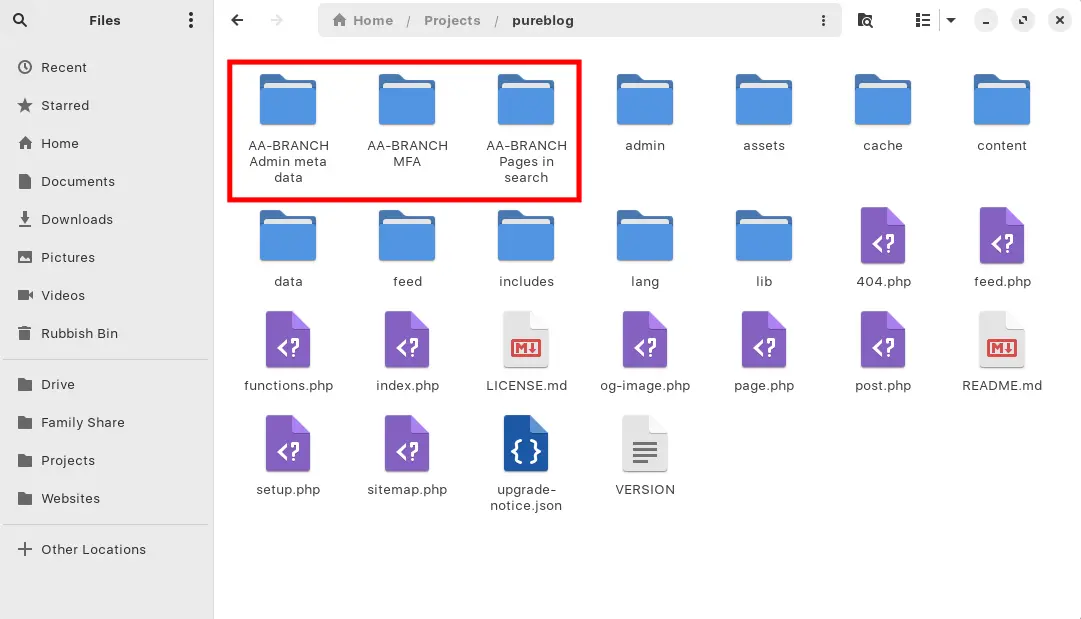
I always prefix my branch folders with AA-BRANCH so they're always at the start of my folder tree and easy to see. Switching branches is then just a simple cd away and I can easily see which one I'm in from the command prompt.
And since there's no .git folder in the branch, I can't accidentally mess things up by merging back to main (or any other branch) accidentally.
Almost idiot Kev proof!
Creating branches with purectl
I've created a local Python tool called purectl2 which manages all things Pure. With it, I can do things like pull or push to/from remote for this website, update if there's a new version released, create releases, run local tests, create branches etc.
So if I want to create a new branch, all I need to do is run:
purectl branch pureblogIt will then ask me for the branch name, so I enter something like Pages in search and it will automagically create a new folder called AA-BRANCH Pages in search and copy the latest version of Pure Blog into that folder, excluding .git.
Merging changes
This is where things get interesting. If I'm working on multiple branches at the same time, merging back can be...interesting as I can't use the git merge command, since I'm not using Git for branches.
But that's fine, I actually prefer it this way as I have more control. Merging back to main requires me to do a side-by-side comparison of any files I've changes on that branch, so I have to review everything before manually while merging in changes.
This is definitely not the most efficient way of developing software, but it works for me.
Final thoughts
So there you go, that's my approach to developing the Pure Commons apps. I think it's somewhat scalable for a single person project, such as Pure Commons. If I were working in a team this approach would fall apart quickly though. Lucky I have no friends, ey!
I'm not a professional software developer, and I think that's clear from the way I manage all this. But this system has been working well for me, and is far less abstract for my monkey brain than Git's native branch handling.
What can I say, I'm a Luddite. 🤷🏻♂️
Subscribe for more!
You don't have to keep coming back here to read my latest waffle. There's a couple of ways to subscribe to receive updates whenever I publish new content.